

A workspace becomes far more useful when it feels like it belongs to you. That is especially true for people who spend long hours at a standing setup, because the environment does more than hold a laptop and a keyboard. It shapes focus, comfort, and the rhythm of the workday. The most effective workspaces are not always the most expensive or the most decorated. They are the ones that support your habits, make movement feel easy, and reflect the kind of work you do best. If you have been searching for the Best Standing Desks style of setup, personalization is what turns a practical station into a space you actually enjoy using.
Personalization does not have to mean clutter. In fact, the best customizations usually do the opposite: they simplify the desk, organize the surface, and make the room feel more intentional. The seven ideas below are designed to help you shape a standing area that feels calm, functional, and memorable. Each one is easy to apply, whether you work from home, share an office, or use a corner of a larger room.
Before adding objects or color, decide what kind of mood you want the workspace to create. Some people want a soft, quiet area that helps them focus. Others want a brighter, more energetic space that keeps them alert. A third group prefers something clean and professional that feels polished enough for calls or client work. Picking a visual direction first makes every later decision easier.
That direction might be warm and natural, minimalist and calm, or structured and executive in style. Once you know the feeling you want, you can choose objects, lighting, and storage pieces that support that mood rather than fight it. The result is a setup that feels unified instead of random. A thoughtful desk area is easier to maintain and easier to return to every day.
One of the best ways to personalize your work zone is to make it part of a routine. A standing-friendly setup becomes more meaningful when it signals the start of the day, the beginning of a focus block, or the moment you switch from one kind of task to another. A small ritual can make the space feel more like a workspace and less like a random surface.
For example, you might begin with a notebook, a glass of water, and a clean top. That sequence tells your mind that it is time to work. You can also create a closing routine: clear the surface, put tomorrow’s notebook in place, and reset the station to a calm state. These small habits make the desk feel personal because they belong to your workflow, not just your furniture.
Some people think of a standing station as something they tolerate. A better approach is to treat movement as part of your work identity. When the desk changes with you, the room becomes more responsive, and the routine becomes easier to repeat. That is where personalization starts to matter. You are not only decorating a desk; you are designing a rhythm.
One useful way to do this is to connect specific work modes to specific positions. You might stand while reviewing plans, sit while editing, and switch again during calls. The important part is that your desk supports a pattern you can recognize and repeat. The more familiar the transition feels, the more natural the workspace becomes.
When a desk is easy to change, it is easier to personalize. That is because convenience gives you room to focus on the atmosphere, the layout, and the experience of the workspace rather than the mechanics of using it. Quick transitions make the station feel adaptable, which helps you build a routine around posture changes instead of avoiding them.
There is also a visual benefit. A desk that adjusts smoothly often feels more modern and thoughtful, especially when paired with simple accessories that keep the surface clear. If you want a workspace that feels truly your own, use the flexibility to your advantage. Set the height you prefer, organize tools around the way you work, and adjust the room so the desk feels like a natural extension of your daily pattern.
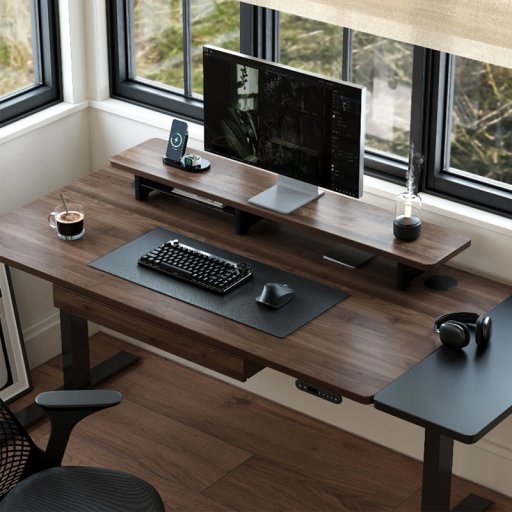
A corner workstation can feel much more personal than a standard straight layout because it gives you distinct zones. One area can be reserved for digital work, another for sketching, notes, or reading, and a third for quick items you use often. That separation helps the surface feel organized and gives the room a more studio-like character.
For many people, a corner setup is also the easiest place to add small touches that reflect personality. A plant, a framed print, or a favorite notebook can sit in the secondary zone without interfering with the main work area. The result is a space that feels both functional and expressive. If your desk is the place where ideas happen, letting it feel a little creative can make the work easier to enjoy.
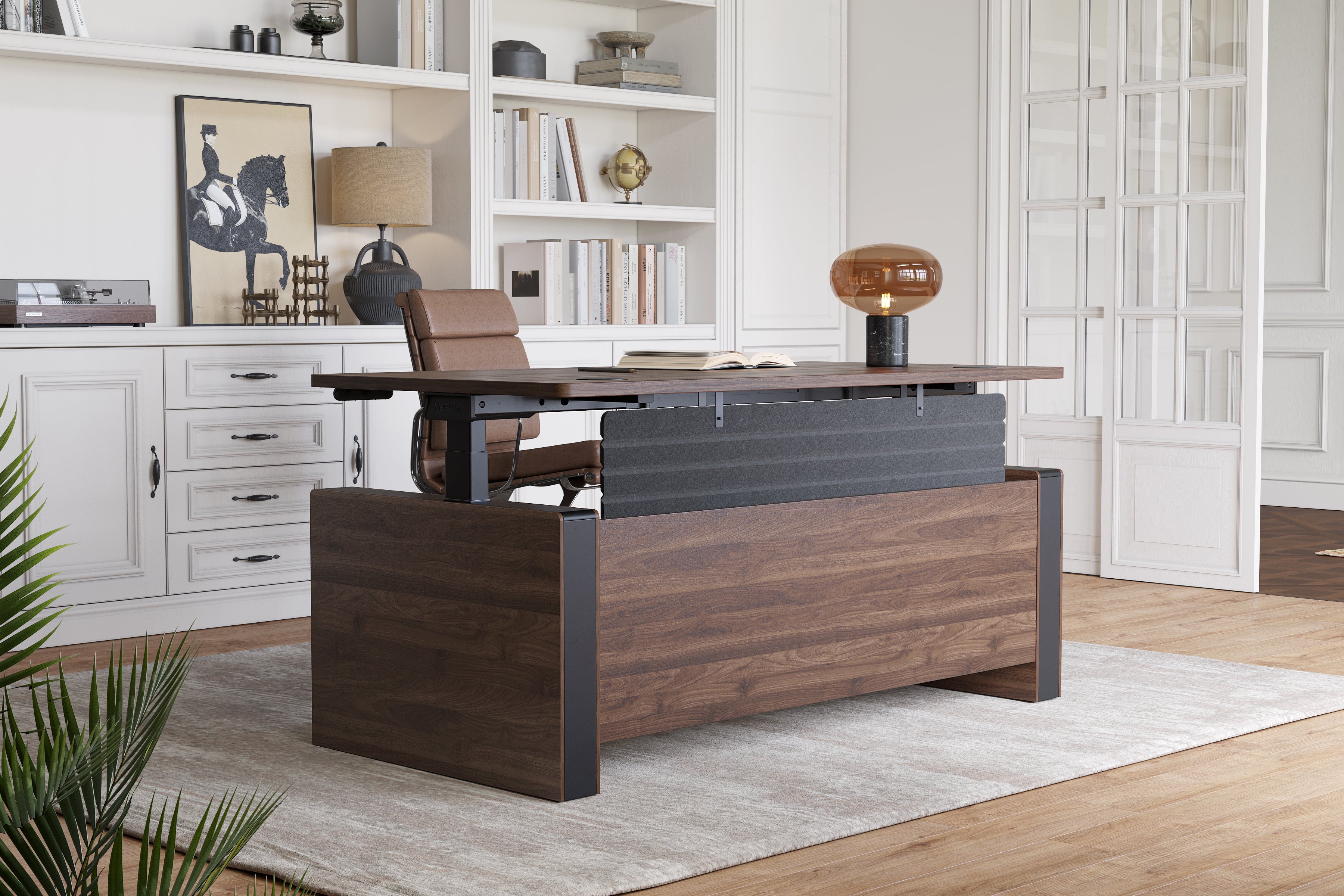
Some workspaces need to feel authoritative and organized. Others need to feel warm and grounded. The right desk surface can support either mood. A larger executive-style setup can create a sense of structure and command, which is especially helpful if you lead meetings, review documents, or work with multiple screens. It gives the room a sense of purpose that can shape how you approach the day.
A wood finish tells a different story. It can make the desk feel warm, natural, and more like a piece of furniture than a temporary workstation. That feeling matters because a workspace that looks and feels good is often easier to maintain. When the desk reflects your identity, the whole room becomes more inviting.
One of the easiest ways to personalize a standing area is to make it feel complete. Lighting is often the fastest upgrade because it changes the mood of the room immediately. A warm task lamp can soften the environment, while a brighter light can make the area feel more alert and focused. Texture matters too. A cloth mat, a ceramic mug, a smooth tray, or a woven organizer can give the setup a more layered, human feel.
The idea is not to fill the desk with extras. It is to choose a few details that make the room feel intentional. When the lighting, texture, and surface materials work together, the space feels less generic and more like a personal studio or command center.
Personalization is not only visual. It also comes from how the space functions throughout the day. A few small habits can make a big difference. You might keep a water bottle in the same spot, place tomorrow’s notes on the desk before logging off, or store a weekly planner on the side of the surface. These habits give the area a sense of rhythm and ownership.
It can also help to set up a daily reset. At the end of the day, clear the surface, return tools to their places, and leave the desk ready for tomorrow. That one step keeps the workspace from becoming chaotic and helps you return to it with less resistance. A personalized desk is usually a more sustainable desk because it works the way you like to work.
Sometimes the most useful ideas come from other people’s routines. User feedback can reveal which features feel most comfortable, which layouts are easiest to maintain, and which small changes make the biggest difference over time. That can be especially helpful if you are deciding how to shape a workspace that needs to suit both productivity and personality.
Reading how others use their setup can also help you spot your own preferences more clearly. Maybe you care most about surface texture. Maybe you want a more polished look. Maybe your priority is keeping the layout simple enough that the desk never feels crowded. Reviews can help you refine the setup until it feels more like your own.
Personalizing a standing area is really about making work feel easier to enter and more pleasant to stay in. Start with the feeling you want, then choose the layout, lighting, textures, and small routines that support it. The more the space reflects your habits and style, the more likely you are to use it consistently and with focus. A personalized desk does not need to be elaborate. It just needs to feel like yours.
Standing desks have moved from novelty to norm in many workplaces and home offices, but the transition raises a lot of practical questions. As an ergonomist, I hear the same concerns every day: how long should I stand, will a standing desk fix my back pain, and which model actually fits my space? This FAQ-style guide answers those common questions with evidence-backed advice and pragmatic tips so you can use a standing solution safely and comfortably.
Short answer: usually yes, with a few caveats. A standing desk can reduce prolonged sitting and encourage micro-movements that benefit circulation and posture. However, it’s not a cure-all. People with certain medical conditions—severe orthopaedic issues, some circulatory disorders, or recent lower-limb injuries—should consult a clinician before making a big change. For most users, alternating between sitting and standing is the healthiest pattern: think dynamic movement, not static standing.
Begin by setting screen height and keyboard position. Your eyes should naturally hit the top third of the monitor when standing, with the screen roughly an arm’s length away. The keyboard should sit at elbow height so your forearms are parallel to the floor and wrists are neutral. Position the monitor directly in front of you to avoid twisting. Anti-fatigue mats and supportive shoes soften impact on the feet. Finally, adopt a gentle micro-movement routine—calf raises, small weight shifts, or short walks—to avoid standing still for long periods.
Look for stability at full height, a height range that accommodates your stature, and simple controls you’ll actually use. Memory presets are helpful if multiple people use the same workstation. Anti-collision sensors, decent load capacity, and minimal wobble are also worth prioritizing. A desk that’s easy to adjust encourages the crucial habit of alternating postures throughout the day.
Rather than rigid rules, aim for variety. A practical pattern many find comfortable is to change position every 30–60 minutes. Start with short standing intervals—ten to twenty minutes—if you’re new to it, then gradually increase. The overall daily goal is to break up long sitting bouts frequently; a handful of standing breaks spread throughout the day is more effective than a single long stint.
Corner desks are a smart choice if you need multiple work zones—one for a primary monitor and the other for paperwork or second tasks. L-shaped standing desks that lift both wings in sync preserve ergonomic alignment across the whole surface. They make multitasking smoother and save central floor space, which is why they’re popular in smaller home offices and design studios.
An executive model brings extra surface area, higher load capacity, and sometimes premium finishes. If you frequently use multiple monitors, paper references, or heavier equipment, an executive standing desk gives you room to spread tasks without compromising stability. For many home offices, a mid-sized lifting desk hits the sweet spot; choose an executive model if you need the space or want a more formal aesthetic.
Wood tops add warmth and can be very durable; solid or veneered wood also resists scratches in different ways than laminates. The choice often comes down to aesthetics, budget, and maintenance preferences. Wood can feel more substantial underfoot and integrates well with home décor, while laminates and glass options may offer easier cleaning and lighter weight. Either can perform well as long as the frame and lift system are robust.
Some buyers want to compare market options before deciding. A well-engineered standing desk typically features stable lifts, easy-to-use controls and durable surfaces. If you research brands, pay attention to motor quality, lifting speed, and cable organization. Many modern designs include programmable memory buttons so you can save ideal sit and stand heights — a convenience that matters when you switch positions many times per day. If you’re curious about a specific model, manufacturer pages and spec sheets are helpful starting points.
User reviews reveal how desks perform in real homes: whether the motors stay quiet, how the frame handles heavy monitors, and if assembly is straightforward. Look for balanced reviews that mention long-term durability and customer service responsiveness. Feedback from people who use desks daily — for both work and parenting multitasks — is especially valuable. Verified user experiences often highlight small but important details you won’t see in product photos, such as the feel of the control panel or the stability when leaning on the surface.
Start slow, prioritize adjustability and stability, and treat your workstation as an evolving system—not a one-time purchase. Track how you feel and tweak monitor height, keyboard position, and standing duration until you find a rhythm that fits your body and work demands. And remember: a standing desk is a tool for movement, not a replacement for regular breaks, stretching, or exercise.
Standing desks offer meaningful benefits when used with attention to ergonomics and movement. Whether you choose a stand-up desk, a corner L-shaped model, a wooden top, or an electric adjustable desk, the key is to build habits that mix sitting with standing and to use accessories that support neutral posture. If you have specific concerns or a complex health history, consult both ergonomics guidance and clinical advice—then test a setup gradually. With the right approach, a standing desk becomes a practical, health-positive addition to almost any workspace.