


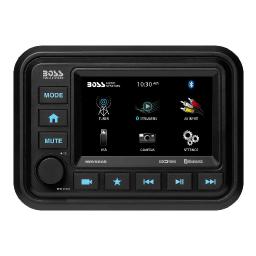
A modern vehicle dashboard should make everyday driving more convenient, connected, and enjoyable. Traditional car stereos often provide limited control options and basic connectivity, while newer multimedia receivers bring touchscreen operation, smartphone integration, entertainment features, and improved access to essential audio settings. These upgrades can transform the way drivers interact with their vehicle without requiring a complete dashboard redesign.
A well-selected multimedia system does more than replace an older radio. It can create a more organized driving environment, simplify access to music and navigation, and provide additional ways to manage calls and entertainment. Understanding the available features, installation requirements, and compatibility considerations helps drivers choose a system that complements their vehicle and listening preferences.
The dashboard serves as the central control area for many driving activities. A touchscreen receiver introduces a more direct way to access music, radio stations, connected devices, and supported applications. Instead of navigating several physical buttons, drivers can use clearly arranged on-screen controls to reach commonly used functions.
Screen size and interface design both influence everyday usability. A larger display can make menus easier to view, while a responsive touchscreen helps reduce the effort required to select different settings. However, screen size alone should not determine the purchase. Button placement, menu organization, brightness, and viewing angles also affect how comfortably the system works inside the cabin.
For drivers considering a modern touchscreen car stereo, the most useful upgrade is one that makes essential functions easier to access. A straightforward interface can improve convenience without overwhelming the dashboard with unnecessary options.
Smartphone integration has become an important part of modern in-car entertainment. Drivers often rely on their phones for navigation, music streaming, contact information, and communication. A compatible multimedia receiver can bring supported smartphone functions into a more accessible dashboard interface.
Depending on the specific model, connectivity options may include Bluetooth, USB connections, and compatibility with supported smartphone platforms. These features can provide several practical benefits:
Hands-free calling: Compatible Bluetooth connections allow drivers to manage calls through the vehicle's audio system.
Wireless or wired music playback: Supported connections make it easier to enjoy playlists and streaming audio.
Navigation access: Compatible smartphone integration can display supported navigation applications on the receiver.
Contact management: Some systems allow access to synchronized contacts and recent call information.
Device charging: A suitable USB connection may provide power to compatible mobile devices.
Not every receiver offers the same connectivity features. Buyers should check the exact model specifications before assuming that wireless smartphone integration, a particular application platform, or advanced voice controls are included.
A touchscreen should provide more than an attractive appearance. Its performance influences how easily drivers can navigate menus, adjust settings, and switch between entertainment sources.
Several display characteristics deserve attention before purchasing:
Screen resolution: A clear display helps make text, icons, and menus easier to recognize. Higher resolution can improve visual detail, although overall screen quality also depends on panel technology and software design.
Brightness adjustment: Dashboard displays face changing lighting conditions throughout the day. Adjustable brightness can help maintain visibility in bright sunlight and reduce glare during nighttime driving.
Touch response: A responsive panel makes menu navigation more natural. Delayed responses or difficult-to-select icons can make an otherwise feature-rich system frustrating to operate.
Viewing angle: The screen should remain reasonably visible from the driver's normal seating position. Dashboard placement and screen dimensions can influence this experience.
Drivers should also consider whether the interface offers practical shortcuts for commonly used functions. A clean layout is often more useful than a crowded menu filled with features that are rarely needed.
A multimedia receiver can influence more than the way drivers access entertainment. Its audio settings help shape how music sounds through the vehicle's speakers, amplifiers, and subwoofers.
Depending on the model, available controls may include equalizer adjustments, balance and fader settings, crossover options, and subwoofer level controls. These features allow users to make adjustments based on their speaker configuration and personal listening preferences.
For example, a system with aftermarket door speakers may benefit from careful equalizer adjustments that improve vocal clarity. A vehicle equipped with a dedicated subwoofer may require suitable low-frequency settings to keep bass controlled and balanced.
It is important to understand that a touchscreen receiver cannot automatically correct every acoustic problem. Speaker placement, enclosure design, amplifier performance, wiring quality, and cabin characteristics all contribute to the final sound.
A properly configured receiver works best as part of a coordinated audio system rather than as an isolated upgrade.
One of the most important steps in choosing a replacement receiver is confirming that it fits the vehicle. Dashboard dimensions, factory mounting arrangements, wiring connections, and steering-wheel controls can vary significantly between manufacturers and model years.
Before purchasing, check the following details:
Dashboard opening: Confirm whether the vehicle supports a single-DIN or double-DIN receiver and whether additional mounting equipment is necessary.
Wiring harness: Determine which harness or adapter is required to connect the new system safely.
Antenna connection: Some vehicles need an antenna adapter to maintain proper radio reception.
Steering-wheel controls: Check whether the receiver supports the vehicle's factory buttons and whether a separate interface is required.
Factory camera compatibility: Confirm whether an existing rearview camera can connect to the replacement unit.
Dashboard trim: Some installations require a compatible fascia or mounting kit to achieve a clean appearance.
Modern vehicles may also use factory amplifiers, integrated climate controls, or other electronic systems connected to the original infotainment unit. Replacing the radio without considering these connections can affect functions beyond entertainment.
A compatibility check before installation helps prevent unnecessary modifications and unexpected expenses.
Navigation and communication features can make a multimedia upgrade particularly useful for drivers who spend considerable time on the road. When a compatible receiver supports smartphone navigation, drivers can view directions through the dashboard rather than repeatedly checking a handheld device.
Bluetooth calling can also make communication more convenient when paired with a compatible phone. Microphone placement plays an important role in call quality, as an incorrectly positioned microphone may pick up excessive cabin noise or make the driver's voice difficult to hear.
Voice-control functions, when supported, can provide another way to interact with compatible applications. Drivers should configure these features before traveling and learn how they work while the vehicle is parked.
The main objective is to reduce unnecessary distractions. Drivers should always follow local hands-free driving laws and avoid interacting with complicated menus while the vehicle is moving.
Even a feature-rich receiver can deliver disappointing results if the installation is rushed. Proper mounting, secure wiring, suitable grounding, and careful cable management all contribute to reliable operation.
Professional installation can be especially helpful when a vehicle contains factory amplifiers, steering-wheel controls, backup cameras, or complex dashboard electronics. An experienced installer can identify the correct adapters, preserve compatible factory functions, and avoid unnecessary cutting or modification of the original wiring.
After installation, test the major functions individually. Confirm that the touchscreen responds correctly, Bluetooth pairs with the phone, radio reception works, speakers play without distortion, and connected accessories operate as expected.
Routine care also helps maintain a clean and dependable system. Use a soft microfiber cloth to clean the display, avoid harsh chemicals, and keep liquids away from the receiver. Software updates should follow the manufacturer's instructions for the specific model.
A touchscreen receiver can become the foundation of a broader vehicle audio upgrade. Drivers who want more detailed sound may eventually consider improved door speakers, an external amplifier, a dedicated subwoofer, or an audio processor.
The order of upgrades matters. Replacing speakers without checking their power requirements can create compatibility issues. Adding an amplifier without appropriate wiring and electrical support can also affect system reliability.
A practical approach begins with identifying the limitations of the existing setup. If the main concern is outdated connectivity, a receiver upgrade may be enough. If music lacks clarity or bass impact, the speaker and amplification arrangement may need additional attention.
Matching each component to the others creates a more consistent result. It also helps avoid spending money on features that do not address the actual needs of the vehicle.
The best multimedia receiver is not necessarily the one with the longest feature list. Drivers should prioritize the functions they will use regularly and confirm that those features work with their vehicle and smartphone.
Someone who frequently uses navigation may prioritize smartphone integration and display visibility. A driver focused on music playback may place greater importance on audio adjustment options, multiple input sources, and amplifier compatibility. Others may value Bluetooth calling, camera support, or retaining factory steering-wheel controls.
Taking time to compare specifications, installation requirements, and interface design can lead to a more satisfying purchase. A carefully selected system makes the dashboard easier to use while providing a stronger foundation for future entertainment upgrades.
A dashboard upgrade can change how drivers experience entertainment, communication, and everyday vehicle controls. A well-matched touchscreen receiver combines convenient access to compatible smartphone features with practical audio adjustments and a cleaner multimedia interface.
The most successful installation balances modern functionality with vehicle compatibility, safe operation, and dependable sound performance. By evaluating display quality, connectivity, installation needs, and audio features before making a decision, drivers can create a more useful and enjoyable cabin environment.
| No comments yet. Be the first. |
