
Blogs

Fitraflex Plus peut être intégré à une routine quotidienne destinée aux personnes qui souhaitent adopter une approche plus structurée de la gestion du poids. La perte de poids est un objectif personnel qui demande généralement du temps, de la constance et des habitudes adaptées au mode de vie de chacun. Plutôt que de rechercher une solution rapide, il est préférable de construire progressivement une routine comprenant une alimentation variée, une activité physique régulière, une bonne hydratation et un sommeil suffisant. Dans ce contexte, Fitraflex Plus peut être envisagé comme un complément à ces habitudes et non comme un remplacement des principes essentiels d’un mode de vie sain. Pour accompagner un objectif de gestion du poids, il peut être utile de privilégier des repas équilibrés composés de légumes, de fruits, de protéines, de céréales complètes et de sources naturelles de fibres. La réduction des excès alimentaires et une meilleure organisation des repas peuvent également contribuer à une routine plus régulière. L’activité physique constitue un autre élément important : marcher davantage, pratiquer un sport, faire du vélo ou réaliser des exercices adaptés à ses capacités sont autant de possibilités permettant de rester actif au quotidien. L’utilisation de Fitraflex Plus doit toujours respecter les instructions et la dose recommandée par le fabricant. Comme chaque organisme est différent, les effets et les résultats peuvent varier d’une personne à l’autre. Plusieurs facteurs, tels que l’âge, les habitudes alimentaires, le niveau d’activité, le métabolisme et le mode de vie général, peuvent influencer l’évolution du poids. Il est donc important de conserver des attentes raisonnables et de ne pas considérer un complément alimentaire comme une garantie de perte de poids. Une démarche durable repose avant tout sur des changements réalistes que l’on peut maintenir dans le temps. Il est également conseillé de vérifier attentivement la composition du produit avant son utilisation et de demander l’avis d’un professionnel de santé en cas de doute. Les personnes qui suivent un traitement médical, qui présentent un problème de santé particulier ou qui sont enceintes ou allaitantes devraient notamment obtenir un avis professionnel avant de commencer un complément alimentaire. Fitraflex Plus peut ainsi s’inscrire dans une démarche personnelle orientée vers le bien-être et une meilleure gestion des habitudes quotidiennes. L’objectif principal devrait rester l’adoption d’un mode de vie équilibré plutôt que la recherche de résultats immédiats. En combinant une alimentation adaptée, une activité physique régulière et des habitudes quotidiennes cohérentes, chacun peut construire une approche plus responsable de la gestion du poids. Utilisé dans ce cadre et conformément aux recommandations du fabricant, Fitraflex Plus peut compléter une routine de bien-être, tout en gardant à l’esprit qu’aucun complément ne remplace les bases d’une alimentation saine et d’un mode de vie actif. https://fitraflexplus.fr/

The Royal Jordanian Chicago Office is a helpful resource for passengers who need information about Royal Jordanian flights and travel services. Travelers can contact the Royal Jordanian Office in Chicago for assistance with flight reservations, ticket changes, cancellations, baggage inquiries, check-in, seat selection, and flight schedules. Passengers can also ask about travel requirements, airline policies, and special assistance services. Whether you're flying from Chicago for business, leisure, or to visit family and friends, the Royal Jordanian Chicago Office can provide useful guidance to help make your travel arrangements easier and more convenient.
How to Build a Doctor Scheduling App with Smart Appointment Management
By Dreamertechnoland, 2026-08-17
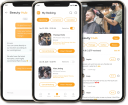
Booking a doctor's appointment should be simple for patients and manageable for healthcare teams. But managing appointments can be tricky with phone calls, scheduling conflicts, cancellations, and doctors' availability changes. These are problems that digital scheduling can help solve.
The American Medical Association reported that Sutter Health patients self-scheduled more than 4 million appointments in 2024. The health system saw a 27% drop in scheduling request messages after expanding online scheduling.
It's a good example of why a well-designed scheduling platform can be more than a booking tool for clinics and health care businesses. If it has the right features, it can improve appointment management, reduce administrative work and make healthcare access more convenient.
What Is a Doctor Scheduling App?
Doctor appointment scheduling app enable users to find medical practitioners, see available appointment slots, make appointments, and receive notifications through an online portal.
For doctors and clinic administration, the application serves as a platform to manage schedules, appointment types, cancellations, patient details, and availability all from one place.
A good scheduling system is also capable of automating tasks, thus enabling staff to attend to patients more.
Key Features to Include in a Doctor Scheduling App
The correct features will be determined by the health facility and the services it offers. A typical scheduling application should include the following:
Patient Registration
Enable patients to create accounts and manage their information.
Doctor Profiles
Show specialities, consultation fee, experience, availability, and any other information.
Appointments
Let the patient choose a doctor, the date, time, and the type of appointment.
Calendar
Assist doctors and staff in managing the available and unavailable slots.
Appointment Reminders
Remind patients about the appointment using push notifications, emails, and SMS.
Rescheduling and Cancellation
Enable patients to change appointments according to the clinic's policy.
Online Payment
Enable the user to pay for the consultation where possible.
Admin Dashboard
Provide control to the admin over doctors, patients, appointments, and schedules.
Telemedicine
Incorporate virtual consultations where virtual consultations are offered.
Report Generation and Analytics
Monitor bookings, cancellations, and usage.
How Smart Appointment Management Works
The system must not only show the schedule but also calculate how many appointments the doctor can do, taking into account breaks between appointments, the doctor's schedule and vacations, the type of appointments, etc.
Thus, the smart scheduling system must be able to calculate the available time and avoid suggesting an appointment that coincides with another appointment or break. If a patient cancels the appointment, then the slot becomes available, and the system can propose it again, following the clinic's scheduling policy.
A waitlist can also help fill in cancelled slots. When an appointment is cancelled, the patients can be notified that an earlier appointment is available.
How to Develop an Appointment Booking App
Scheduling needs to do more than just show a schedule. It needs to take into account the doctor's availability, appointment length, break times, holidays, appointment type, and current appointments before giving out an appointment time.
This way, when the doctor has a 30-minute consultation followed by an unavailable slot, the appointment is not scheduled. Furthermore, when a patient cancels an appointment, the slot can be reused by the system based on the scheduling guidelines of the clinic.
Having a waitlist could assist the clinic in filling slots that patients cancel. This way, patients can be notified when a slot opens up.
Steps to Build an Appointment Booking App
To develop an appointment booking app, first of all, you need to identify the scheduling challenges you want to address in your healthcare company.
1. Requirements Definition
Determine what type of appointments, who are going to use the system, how and where payments should be processed, etc.
2. Scheduling Logic Development
Develop the rules for scheduling and the calculations of time availability, appointment time, breaks, vacation, appointment cancellations, rescheduling and recurring appointment scheduling. This is one of the most important aspects of the project.
3. Select the Technology
Choose the mobile technology platforms, back-end architecture, database, push notification services, payment gateway services, and other integrations necessary for the app.
4. Develop and Integrate the App
The development team can now develop the patient app, doctor interface, admin panel, and all APIs or healthcare system integrations.
5. Test the Booking Process
Test the process under different circumstances, including double booking, cancellation, time zone differences, unavailability of doctors, failed payment, and heavy booking activity.
6. Deploy and Refine the App
After deployment, evaluate the performance of the application. Regular updates will enhance usability and security.
Final Thoughts
A good doctor scheduling app can help ease the process of scheduling appointments and avoid scheduling conflicts, making appointment bookings easier for both patients and doctors. With the proper choice of features and technologies, companies will be able to create a good scheduling app for effective healthcare and business development.

يُعد اختيار التوقيت المناسب عاملاً مهماً عند التخطيط لجلسة تجميلية، خاصةً عندما يتعلق الأمر بعلاج يجعل البشرة أكثر حساسية للشمس خلال فترة التعافي. ويساعد التقشير الكيميائي في دبي على تحسين مظهر التصبغات والبهتان والملمس غير المتجانس، لكن الحصول على نتيجة آمنة يعتمد على نوع التقشير، وحالة البشرة، وقدرتك على الالتزام بالحماية من أشعة الشمس قبل الجلسة وبعدها.
لماذا يؤثر الموسم في التقشير؟
يعمل التقشير الكيميائي على إزالة جزء من الخلايا السطحية المتضررة من الجلد، وقد يكشف عن بشرة جديدة أكثر حساسية للعوامل الخارجية. وبعد الجلسة، قد يصبح الجلد أكثر عرضة للاحمرار والجفاف والتصبغات إذا تعرض للشمس دون حماية مناسبة.
تتميز دبي بمناخ مشمس معظم أيام السنة، لذلك لا يوجد موسم خالٍ تماماً من الأشعة فوق البنفسجية. ومع ذلك، تختلف سهولة التعافي حسب درجة الحرارة، ومدة التعرض للشمس، والأنشطة الخارجية، ومدى التزام الشخص بتعليمات العناية.
الشتاء: غالباً أفضل فترة للتقشير
تُعد أشهر الشتاء، من ديسمبر إلى فبراير تقريباً، من أكثر الأوقات راحة لإجراء التقشير في دبي. تكون درجات الحرارة عادةً ألطف، ويقل تعرق الوجه والانزعاج الناتج عن الحرارة، كما يفضل كثير من الأشخاص البقاء في أماكن داخلية خلال فترة التعافي.
تساعد الأجواء المعتدلة على الالتزام بروتين العناية، خصوصاً إذا ظهرت قشور أو جفاف بعد الجلسة. لكن انخفاض الحرارة لا يعني اختفاء خطر الشمس؛ فالأشعة فوق البنفسجية قد تظل مؤثرة حتى في الأيام الباردة أو الغائمة. لذلك يظل واقي الشمس ضرورياً طوال العام.
يكون الشتاء مناسباً بشكل خاص لمن:
-
يخططون لإجراء سلسلة من التقشيرات السطحية.
-
يستطيعون تقليل الأنشطة الخارجية بعد الجلسة.
-
يرغبون في بدء علاج تدريجي للتصبغات أو البهتان.
-
لا يعانون من سفر قريب إلى وجهة مشمسة.
-
يمكنهم الالتزام بالترطيب وواقي الشمس.
الخريف والربيع: توقيتان مناسبان أيضاً
تُعد فترتا الخريف والربيع خيارين جيدين في كثير من الحالات، خصوصاً إذا كان الموعد بعيداً عن الرحلات والأنشطة الخارجية الطويلة. وقد تكون الأجواء أكثر اعتدالاً من الصيف، مع ضرورة التخطيط المسبق لفترة التعافي.
في الربيع، قد يزداد التعرض للشمس تدريجياً، بينما قد يعود الناس في الخريف إلى ممارسة الأنشطة الخارجية بعد أشهر الصيف. لذلك لا يكفي اختيار الموسم وحده؛ بل يجب تقييم جدولك الشخصي.
إذا كنت ستقضي وقتاً طويلاً على الشاطئ، أو تمارس الرياضات الخارجية، أو تسافر إلى منطقة مشمسة، فمن الأفضل تأجيل التقشير إلى ما بعد هذه الأنشطة. وتوصي عيادات جلدية بتجنب التسمير والتعرض المباشر للشمس قبل جلسات التقشير، لأن البشرة المسمرة أو المصابة بحروق شمسية قد لا تكون مناسبة للعلاج.
الصيف: هل يمكن إجراء التقشير؟
يمكن إجراء بعض أنواع التقشير السطحي خلال الصيف، لكن الأمر يتطلب احتياطات أكثر صرامة. فارتفاع الحرارة والرطوبة قد يزيدان التعرق والاحتكاك، بينما تؤدي كثرة التعرض للشمس إلى رفع احتمال التصبغات بعد الالتهاب.
لا يُنصح عادةً بالتقشير قبل قضاء إجازة على الشاطئ أو قبل رحلة تتضمن ساعات طويلة في الهواء الطلق. كما يجب تأجيل الجلسة إذا كانت البشرة مصابة باحمرار أو اسمرار حديث أو حرق شمسي.
إذا رأى الطبيب أن الجلسة مناسبة في الصيف، فقد يختار تقشيراً سطحياً بتركيز لطيف، مع تعليمات واضحة بشأن تجنب الشمس وارتداء قبعة واسعة واستخدام واقي شمس واسع الطيف. وقد يكون تحديد موعد الجلسة في المساء مفيداً لتقليل التعرض المباشر للشمس بعد العلاج، لكن هذا لا يغني عن العناية المطلوبة.
أفضل وقت خلال اليوم
يُفضل كثير من الأشخاص إجراء الجلسة في وقت يسمح لهم بالعودة إلى المنزل أو البقاء في مكان داخلي بعد العلاج. قد يكون الموعد الصباحي مناسباً إذا كنت ستتجنب الشمس بقية اليوم، بينما يمكن أن يكون الموعد المسائي مريحاً لمن لديهم التزامات خارجية خلال النهار.
الأهم هو أن تتوافر لك فترة هادئة بعد الجلسة دون ممارسة رياضة شديدة أو التعرض للحرارة أو وضع مستحضرات مهيجة. اسأل العيادة عن التعليمات المحددة؛ فقد تختلف حسب نوع التقشير ودرجة البشرة.
كيف تخطط للموعد قبل مناسبة مهمة؟
إذا كنت تستعد لحفل أو زفاف أو جلسة تصوير، فلا تجعل موعد التقشير قريباً جداً من المناسبة. قد يظهر احمرار أو جفاف أو تقشر في الأيام التالية، وتختلف مدة التعافي من شخص إلى آخر ومن نوع إلى آخر.
يفضل بعض المختصين إجراء التقشير قبل المناسبة بمدة كافية تسمح بمرور مرحلة التقشر والتأكد من استقرار البشرة. أما التقشير المتوسط أو العميق، فقد يحتاج إلى فترة أطول بكثير من التقشير السطحي. لذلك يجب وضع جدول زمني واقعي بعد استشارة الطبيب، وعدم تجربة مادة جديدة قبل مناسبة مهمة مباشرة.
ماذا تفعل قبل الجلسة؟
ابدأ قبل الموعد بالالتزام بروتين بسيط يركز على تنظيف البشرة بلطف وترطيبها وحمايتها من الشمس. وقد يطلب الطبيب إيقاف الريتينول أو التريتينوين أو أحماض التقشير أو المقشرات الحبيبية لفترة محددة. لا توقف أي علاج موصوف دون استشارة.
تجنب أيضاً الشمع وكريمات إزالة الشعر والليزر والديرمابرايشن والعلاجات القوية للوجه خلال المدة التي تحددها العيادة. كما يجب إبلاغ الطبيب عن جميع الأدوية، والحمل أو الرضاعة، والحساسية، وتاريخ قرح البرد أو الندبات البارزة.
العناية بعد التقشير في أجواء دبي
بعد الجلسة، استخدم واقي شمس واسع الطيف حسب توجيهات الطبيب، وأعد تطبيقه عند الحاجة، خاصة إذا كنت خارج المنزل. ارتدِ قبعة ونظارات شمسية وحاول البقاء في الظل، وتجنب أشعة الشمس المباشرة خلال فترة التعافي.
استخدم مرطباً لطيفاً ولا تفرك القشور أو تحاول نزع الجلد بيدك. كما يُفضل تأجيل الساونا، والحمامات شديدة السخونة، والسباحة، والتمارين التي تسبب تعرقاً شديداً حتى يسمح الطبيب بذلك. وتؤكد تعليمات ما بعد التقشير الطبية أهمية تجنب الشمس والحرارة المباشرة وحماية المنطقة المعالجة.
كيف تختار نوع التقشير حسب الموسم؟
في فصل الشتاء أو الفترات المعتدلة، قد يكون من الأسهل الالتزام بخطة تقشير سطحي أو متوسط، بشرط عدم وجود تعرض شمسي طويل. أما في الصيف، فقد يكون التقشير السطحي اللطيف أو تأجيل العلاج خياراً أكثر أماناً لبعض الأشخاص.
لا يعتمد الاختيار على الموسم فقط. فالبشرة الدهنية، والحساسة، والداكنة، والمعرضة للتصبغات، تحتاج كل منها إلى خطة مختلفة. وقد يوصي الطبيب بتجربة منطقة صغيرة أو استخدام تحضير خاص قبل الجلسة.
كيف تختار عيادة مناسبة؟
ابحث عن عيادة مرخصة يعمل فيها طبيب جلدية أو مختص مؤهل، واسأل عن نوع المادة وتركيزها، والخبرة مع نوع بشرتك، وفترة التعافي، والتكلفة، وخطة التعامل مع أي آثار جانبية. كما يجب أن تتوفر تعليمات مكتوبة للعناية قبل الجلسة وبعدها.
يمكنك زيارة عيادة تجميل دبي للتعرف على خيارات العناية بالبشرة والإجراءات التجميلية، ثم طلب استشارة تساعدك على تحديد التوقيت المناسب وفقاً لنمط حياتك ومواعيد السفر والأنشطة الخارجية.
الخلاصة
غالباً ما تكون أشهر الشتاء والفترات المعتدلة في الخريف والربيع من أفضل الأوقات لإجراء التقشير الكيميائي، لأنها قد تسهّل تقليل التعرض للحرارة والشمس خلال التعافي. ومع ذلك، يمكن إجراء بعض الجلسات في الصيف عند اختيار نوع مناسب والالتزام الصارم بالحماية من الأشعة، بينما يجب تأجيل العلاج عند وجود تسمير أو حرق شمسي أو رحلة قريبة. وعند التخطيط لـ التقشير الكيميائي في دبي، اجعل الاستشارة الطبية، وحماية البشرة من الشمس، واختيار التوقيت الذي يناسب جدولك أولويات أساسية للحصول على نتيجة آمنة ومتوازنة.

Why Disposable Vape Products Are Popular With Adult Users
A disposable vape is a simple vaping device designed for adult smokers and existing vapers who want an easy, low-maintenance option. Most devices come ready to use, which means there is usually no need to fill e-liquid, install a coil, or set up complicated settings.
For adult users, convenience is one of the main reasons these devices remain popular. However, there are risks associated with vaping, and nicotine is addictive. These products are intended for adults only, and people who do not smoke or vape should not start.
What Is a Disposable Vape and How Does It Work?
A disposable vape is a compact electronic device that contains a battery, heating coil, and e-liquid. When the user inhales, the device heats the liquid and produces vapour.
Many devices are draw-activated, so there is no need to press a button. Some newer models may also include rechargeable batteries, larger liquid capacity, or simple display screens.
The main parts usually include:
- Built-in battery
- Pre-filled e-liquid
- Heating coil
- Mouthpiece
- Airflow system
- Indicator light or display on some models
Because everything is already assembled, the device is usually simple to use from the first puff.
Why Adult Users Choose Disposable Devices
The main advantage is convenience. A disposable vape normally requires less setup and maintenance than a refillable kit.
Adult users may choose these products because they offer:
- Simple operation
- No coil replacement
- No manual refilling
- Compact and portable design
- Wide flavour selection
- Different nicotine strengths
- Easy option for travel or occasional use
For people who prefer more control over e-liquid and long-term costs, refillable devices may be a better choice.
You can also explore our guide to gotek vape to compare different device types.
Important Things to Check Before Choosing a Disposable Vape
Not every device offers the same experience. Before buying a disposable vape, adult users should check several important details.
Nicotine Strength
Nicotine strength can vary between products. Always read the product information carefully and choose a strength that is suitable for your existing nicotine use.
Nicotine is addictive, so users should avoid selecting stronger products than necessary.
Puff Count
Puff count is an estimated number, not a guaranteed amount.
Actual usage can depend on:
- Length of each puff
- Frequency of use
- Battery capacity
- E-liquid quantity
- Device design
A person who takes longer puffs may use the device faster than someone who takes shorter ones.
Battery Type
Some products have non-rechargeable batteries, while others can be recharged.
If the device is rechargeable, use the recommended charging method and avoid damaged cables or unsuitable chargers.
Flavour Choice
Flavour is a personal preference. Common options may include fruit, mint, menthol, dessert-style, and tobacco-inspired flavours.
Adult users should choose based on personal preference rather than assuming that one flavour is better than another.
Product Information
A reliable seller should clearly show important details such as nicotine strength, liquid capacity, battery information, estimated puff count, and usage instructions.
Clear product information helps customers make a more informed decision.
Using and Storing Disposable Devices Responsibly
A disposable vape should be handled carefully because it contains a battery and electronic parts.
Keep the device away from extreme heat, direct sunlight, water, and young children. Do not use a product if the battery is damaged, swollen, leaking, or unusually hot.
Used devices should not normally be placed in standard household waste because they contain electronic components and batteries. Check local recycling or electronic waste disposal options where available.
Never open, puncture, crush, or attempt to modify the device.
FAQs About Disposable Vape Products
How long does a disposable vape last?
It depends on the liquid capacity, battery size, puff length, and how often it is used. Puff counts should be treated as estimates.
Does a disposable vape need charging?
Some devices do not require charging, while certain larger models include rechargeable batteries. Always check the product details.
Are disposable vapes risk-free?
No. Vaping is not risk-free. Products containing nicotine can also cause dependence because nicotine is addictive.
Can non-smokers use disposable vapes?
People who do not already smoke or vape should not start. These products are intended for adult smokers and existing adult vapers.
How should I dispose of a used device?
Because the device contains a battery and electronic components, use an appropriate battery or electronic waste recycling service where available.
Key Takeaways
A disposable vape offers a simple option for adult smokers and existing vapers who prefer a device with minimal setup and maintenance.
Before choosing one, check nicotine strength, estimated puff count, battery type, flavour, and product information. Buy only from reliable retailers that provide clear details and responsible age restrictions.
Most importantly, remember that vaping is not risk-free, nicotine is addictive, and disposable vaping products are intended for adults only.
Explore our related collection to find more options that match your needs and preferences.

Why Point of Sale Systems Matter for Modern Businesses
Running a business smoothly depends on having the right tools in place. Point of sale systems help shops, restaurants, cafes, salons, and many other businesses handle daily sales in a simple and organized way.
A modern POS system does much more than process payments. It can track products, manage stock, record customer orders, create sales reports, and help staff work faster. Choosing the right system can save time, reduce mistakes, and give business owners a clearer view of their daily performance.
What Are Point of Sale Systems?
Point of sale systems are tools used to complete sales transactions. They usually combine hardware and software to record orders, calculate totals, accept payments, and print or send receipts.
Older checkout systems were mainly used as cash registers. Modern systems offer many more features and can connect different parts of a business.
A typical setup may include:
- POS software
- Touchscreen or computer
- Barcode scanner
- Receipt printer
- Cash drawer
- Card payment terminal
- Customer display
- Inventory tools
Some businesses use simple setups, while larger companies may need several terminals connected to the same system.
How a POS System Works
When a customer buys a product, the staff member selects or scans the item.
The system automatically adds the price, calculates tax or discounts, and shows the final amount. Once payment is completed, the sale is recorded and the stock level can be updated automatically.
This makes checkout faster and reduces the need for manual calculations.
Key Benefits of Point of Sale Systems
Good point of sale systems can make everyday tasks easier for both owners and employees.
Faster Checkout
Speed is important during busy hours. A POS system allows staff to quickly scan products or select menu items instead of entering prices manually.
Faster service can reduce queues and improve the customer experience.
Better Inventory Control
Inventory management is one of the most useful features of modern POS software.
Businesses can monitor which products are selling, which items are running low, and when new stock may be needed.
This can help reduce both overstocking and product shortages.
More Accurate Sales Records
Manual records can lead to mistakes.
A POS system records each transaction automatically, making it easier to check daily, weekly, or monthly sales.
Reports may include:
- Total sales
- Cash payments
- Card payments
- Online payments
- Discounts
- Taxes
- Best-selling items
- Staff sales performance
These reports can help owners make better business decisions.
Easier Staff Management
Some systems allow each employee to have their own login.
Business owners can control permissions, track working activity, and see which staff members completed certain transactions.
This is especially useful for businesses with several employees or multiple branches.
For more useful information, you can also pos ireland designed to improve everyday operations.
How to Choose the Right POS System
Not every system is suitable for every business. Before making a decision, think about how your business works and which features are most important.
Consider Your Business Type
A retail store may need barcode scanning and strong inventory tools.
A restaurant may need table management, kitchen orders, takeaway options, and menu customization.
A salon may need booking and customer management features.
Choosing software designed around your business type can make daily work easier.
Look for Simple Software
A good system should be easy for staff to learn.
Complicated software can slow down service and create unnecessary mistakes. Look for a clean interface with simple menus and clear buttons.
Check Reporting Features
Reports are valuable because they show how the business is performing.
Look for a system that provides clear information about sales, payments, products, stock, and expenses.
Consider Future Growth
Your business may grow over time.
Choose a system that can support extra users, products, locations, or terminals if needed.
FAQs About Point of Sale Systems
What is the main purpose of a POS system?
The main purpose is to process sales and payments. Modern systems can also manage stock, customers, reports, employees, and other business tasks.
Can small businesses use a POS system?
Yes. Small businesses can benefit from faster checkout, better sales records, and easier inventory management.
Do POS systems work without the internet?
Some systems offer offline features, but this depends on the software. Certain functions, such as online payments or cloud syncing, may require an internet connection.
Can a POS system track inventory?
Yes. Many modern systems automatically reduce stock levels after each sale and can provide low-stock alerts.
What hardware is needed?
Common hardware includes a computer or touchscreen, receipt printer, barcode scanner, cash drawer, and payment terminal. The exact setup depends on the business.
Key Takeaways
Point of sale systems can help businesses improve speed, accuracy, and control over daily operations.
The right system can handle payments, manage inventory, create useful reports, and make work easier for staff. Before choosing one, consider your business type, required features, ease of use, reporting tools, and future growth.
A reliable POS setup is more than a checkout tool. It can become an important part of managing a modern business efficiently.
Explore our related business solutions to find more tools that can support smoother daily operations.
Launch
On-line video slot machine online games get converted the regular slot-machine strategy right digital camera way of leisure. By way of internet-connected units, a candidate older people could gain access to numerous created online games in websites wherever toto slot on-line wagering can be by law granted.
Modern-day on-line plug-ins incorporate aesthetic design and style, audio, movement, along with straightforward game play to make the getting expertise. On the other hand, since his or her effects count on probability, they must be called while leisure rather than reputable income.
What on earth is the On-line Video slot machine?
The on-line video slot machine is often a digital camera sport developed all-around personal reels along with designs. Avid gamers connect to the action through the site as well as request, as you move the upshot of every single participate in will depend on your game's hit-or-miss result technique.
Distinct headings could attribute exclusive graphics, themes or templates, soundtracks, designs, along with particular capabilities. This specific assortment makes it possible for avid gamers to discover online games that will go with his or her personalized leisure personal preferences.
Modern-day On-line Video slot machine Capabilities
Digital camera technological innovation features built video slot machine online games additional confidently assorted. Builders can establish thorough animation, immersive sound files, created interfaces, along with interactive benefit capabilities.
A number of online games in addition provide specifics of his or her designs, regulations, along with probable pay-out odds. Here data ahead of participating in may help consumers have the knowledge a selected sport performs.
Even with the range of capabilities, more visuals as well as particular consequences tend not to adjust the belief that the effect of a new whirl is still doubtful.
Being familiar with Probability
Probability can be core for you to on-line video slot machine games. A new past consequence won't ascertain the subsequent consequence, this means a few is the winner as well as cutbacks are not able to dependably anticipate what's going come about subsequently.
There is zero confirmed means for putting together a earning result. Being familiar with it will help avid gamers keep sensible targets to avoid the treatment of wagering just as one expenditure tactic.
Choosing a Dependable Podium
Older people need to 1st ensure that on-line wagering can be granted of their spot. Wherever it can be authorized, by using a effectively qualified along with managed podium offers critical client protects.
Ahead of generating business relationship, consumers could assessment specifics of stability, solitude, settlement processes, sport regulations, along with responsible-gambling methods.
Defending bill testimonials is usually critical. Solid accounts along with offered stability capabilities may help shield important data.
Dependable On-line Video slot machine Games
On-line plug-ins must be dealt with while pastime leisure. Older people whom tend to participate in need to merely employ income they might pleasantly find the money for to shed.
Placing personalized wasting along with occasion boundaries may help preserve wagering within just feasible borders. Vital house charges, personal savings, took out income, as well as cash essential for critical promises mustn't be used by wagering.
Going after cutbacks can be yet another actions to stop. Looking to restore missing income by simply carrying on with for you to wager could enhance fiscal threat.
Portable On-line Plug-ins
Portable technological innovation features built on-line video slot machine online games offered by way of agreeable cell phones along with medicine throughout spots wherever this sort of wagering can be granted.
Sensitive interfaces let online games to function over distinct monitor styles, even though modern-day portable internet connections offers easy gain access to. Benefit, on the other hand, could also help it become better to save money occasion as well as income when compared with formerly planned, generating personalized boundaries specially critical.
The longer term involving On-line Plug-ins
On-line internet casino technological innovation is constantly on the progress by way of increased visuals, portable interfaces, interactive capabilities, along with innovative software package. Builders are generally generating significantly exclusive digital camera suffers from even though websites carry on and create brand-new strategies to delivering online games.
In spite of engineering innovations, principle portion of probability is still core for you to video slot machine games.
Finish
On-line plug-ins incorporate classic internet casino aspects using modern-day digital camera design and style. His or her various themes or templates, visuals, looks, along with interactive capabilities features built these people a new spectacular way of on-line leisure pertaining to a candidate older people.
A new dependable tactic implies realizing that effects derived from probability, checking out community legal guidelines, employing legit websites, defending important data, along with preserving crystal clear boundaries by the due date along with wasting.
How Cloud Based Tank Management Improves Safety, Inventory, and Efficiency
Tank terminals operate continuously in an environment where circumstances can shift from one moment to the next. Storage volumes change, ownership of products may be transferred during the day, inspections have to be carried out, transport activities need to stay synchronized, and maintenance tasks must be planned carefully. When these responsibilities are handled through separate applications, spreadsheets, or paper based records, teams may be forced to work with conflicting information, resulting in delays, errors, and unnecessary operational challenges.
A cloud based tank farm management platform provides a centralized environment where these essential activities can be managed together. Operations, HSSE, maintenance, and finance teams can access consistent information, improving coordination, reducing mistakes, and helping employees make day to day decisions with greater efficiency.
What Does a Modern Tank Farm Management Platform Do?
A modern tank farm management platform serves as a central operating environment for liquid and gas storage facilities. It can collect information from connected equipment such as tank level, temperature, and pressure sensors and combine those readings with the processes being performed throughout the terminal.
The platform can support activities ranging from nominations and product transfers to documentation and billing, while helping personnel follow defined procedures and safety requirements. Instead of relying on multiple applications, spreadsheets, and paper documents, organizations can oversee individual terminals or broader facility networks through a single cloud based platform that also provides secure mobile access.
Key Features to Consider
Real Time Inventory Monitoring
Continuous telemetry allows inventory information to remain updated while giving operators a clearer picture of current storage conditions. If abnormal level movements, possible contamination, or readings outside approved limits are detected, automated notifications can alert the relevant personnel, allowing potential problems to be investigated and addressed more quickly.
Customer Self Service Portal
Customers and cargo owners can view inventory balances, allocation details, and custody documentation through a protected online portal. Giving customers direct access can reduce lengthy email exchanges, speed up approval processes, and allow terminal personnel to concentrate on operational activities instead of repeatedly handling routine administrative requests.
Product Quality Protection
Built in validation processes can help preserve product quality throughout transfer operations. Density checks, recipe validation, controlled routing, and guided operating procedures can reduce the risk of selecting incorrect transfer paths, mixing products, or introducing seawater contamination during handling activities.
Mobile Field Operations
Field personnel can use mobile devices to complete inspections, capture photographs, scan barcodes, and record observations directly from the worksite. Data can also be collected while connectivity is unavailable and synchronized after a connection becomes available again. This supports dependable recordkeeping and provides a more comprehensive audit trail for field activities.
Integrated Safety and Compliance
Digital workflows can reduce dependence on paper processes by guiding employees through required operational activities in a consistent sequence. Features such as overfill protection, emergency shutdown integration, VOC monitoring, and automated incident records can help teams apply safety measures consistently while maintaining the documentation required for operational and compliance purposes.
Better Commercial Control
Operational dashboards provide management with improved visibility into throughput, asset utilization, and performance across customers, products, terminals, and loading points. Integration with ERP systems can strengthen billing accuracy, simplify invoicing activities, and help reduce revenue leakage that may occur when commercial information is managed manually.
Complete Operational Management
A centralized platform can manage the complete movement of products, whether materials enter or leave a facility through vessels, barges, pipelines, trucks, or ISO containers.
Before a transfer begins, the system can check available storage capacity, align operating schedules, gather information from gauges and radar equipment, and verify driver or crew credentials. Internal transfers and blending activities can then be managed through guided workflows that help personnel select the correct transfer routes. Pipeline operations can incorporate pigging activities, line fill quantities, and interface losses, while drums and IBCs can be monitored using barcode technology to support accurate reconciliation. Additional services, including product heating, additive injection, and specialized handling, can also be recorded automatically to support more accurate commercial billing.
Business Benefits
Lower Operating Costs
Automated inventory reconciliation can reduce discrepancies, while planned and predictive maintenance can help lower the risk of unexpected equipment failures. Together, these capabilities can improve operational efficiency and support tighter control over day to day operating costs.
Faster Decision Making
Managers can obtain inventory information, compliance details, and KPI reports without collecting information manually from multiple systems. Having dependable operational data available in one place supports quicker responses and more informed management decisions.
Flexible Deployment
Industry specific templates can be adapted to existing operating procedures, reducing the requirement for extensive software customization. Whether an organization operates a refinery, LNG facility, or inland storage terminal, the platform can be deployed around established processes while helping reduce implementation complexity and expense.
Secure Remote Access
Supervisors can review and authorize activities remotely, while senior leaders can use secure dashboards to follow terminal performance. Enterprise grade hosting, encrypted communication, and centralized administration can provide security while still giving teams the flexibility to manage activities from different locations.
Who Benefits?
Operations Teams
- Current visibility into inventory conditions
- Guided workflows for product transfers
- Improved truck and vessel turnaround times
HSSE and Compliance Teams
- Digitalized operating procedures
- Automated incident documentation
- Consistent application of safety controls
Maintenance Teams
- Mobile access to maintenance activities
- Comprehensive inspection documentation
- Improved equipment visibility and tracking
Commercial and Finance Teams
- Accurate throughput data
- Dependable ERP integration
- Faster and more accurate invoicing
Customers and Cargo Owners
- Direct access to inventory information
- Secure availability of custody and operational documents
Conclusion
A modern tank farm management platform brings operational data, workflows, safety activities, and commercial reporting together within a single cloud based environment. Instead of forcing organizations to replace their established procedures, it can work alongside existing practices while improving efficiency, compliance, coordination, and overall operational visibility.
For organizations responsible for a single terminal or expanding across several facilities, bringing these activities into one centralized system offers a scalable alternative to spreadsheets, paper documentation, and disconnected legacy applications. By combining information and workflows within one environment, tank terminal operators can establish a stronger operational foundation while supporting greater efficiency and sustainable long term growth.
Book a free demo @ https://toolkitx.com/campaign/tank-management/
Browse More
https://toolkitx.com/blogsdetails.aspx?title=Data-driven-decision-making-in-EHS:-what-to-track,-and-where-to-start
https://toolkitx.com/blogsdetails.aspx?title=How-a-permit-to-work-system-improves-efficiency-(and-safety)
https://toolkitx.com/blogsdetails.aspx?title=The-real-cost-of-safety-violations-in-2025:-fines,-downtime,-and-the-$1b/week-problem
https://toolkitx.com/blogsdetails.aspx?title=EHS-audit-(2025-guide):-definition,-checklist,-process,-and-ISO/OSHA-mapping
From Paper Permits to Digital Control: Modernising Permit to Work Management
Managing hazardous work is not simply a matter of completing permits or meeting regulatory obligations. The real goal is to control risks before they result in injuries, equipment damage, or costly disruption. A digital Permit to Work (PTW) system supports that goal by replacing fragmented paper processes with a centralised platform that strengthens visibility, accountability, and control.
Instead of depending on paper forms, long email chains, or isolated spreadsheets, organisations can oversee the full permit lifecycle within one system. Responsibilities are assigned, progress remains visible, and actions are recorded automatically, creating a reliable and traceable process from the initial request through final closure. Critical information is easier to access, allowing teams to coordinate decisions and respond consistently when conditions shift on site.
Why a Permit to Work Process Matters
Activities such as hot work, confined space entry, electrical isolation, excavation, and work at height require deliberate preparation before work begins. A Permit to Work process creates formal authorisation for these tasks while confirming that hazards have been assessed, controls are in place, and qualified people have reviewed and approved the planned activity.
Digital PTW management strengthens this process by embedding those requirements into a defined workflow. Every request follows a defined sequence, mandatory safety checks are built into the process, and supporting records, including risk assessments and isolation documentation, must be provided before approval can move forward. Role based permissions further restrict permit creation, review, approval, and closure to authorised personnel, making accountability clear throughout the lifecycle.
Why Digital PTW Systems Improve on Paper Based Methods
Paper permits and disconnected electronic files can become difficult to manage when work environments become busy. Several shifts, contractors, and concurrent activities across different areas increase the challenge of manual coordination. Documents may be misplaced, updates may fail to reach the right people, and supervisors may find it difficult to understand exactly what work is taking place.
A digital Permit to Work platform brings these elements together in a central workspace. Permit details, identified hazards, approvals, drawings, attachments, and closeout evidence stay connected, enabling authorised users to locate the information they need without searching separate sources.
Supervisors and safety teams can see which permits are currently active, waiting for approval, or blocked by unresolved conditions. Managers can also review the complete record of each permit, including who approved it, when decisions were made, and what actions were documented throughout the process.
Features That Deliver Practical Operational Value
A strong digital Permit to Work solution does more than place an existing paper form on a screen. Flexible permit templates can be configured for different types of work, ensuring that each activity addresses safety requirements appropriate to its hazards.
Embedded checks can guide personnel through hazard identification, isolation verification, and confirmation of necessary personal protective equipment. Automated workflows direct permits to the correct reviewers and approvers while electronic authorisations are captured with exact timestamps.
Real time dashboards provide a current picture of work, supporting more effective shift handovers and reducing unnecessary waiting. Permits can also be associated with equipment, locations, images, drawings, and method statements, keeping relevant information available. Every amendment is retained, creating an audit trail that tracks the permit from creation through final closeout.
How a Digital Permit to Work Workflow Functions
The workflow generally begins when the job owner records the work scope, location, hazards, proposed controls, and supporting files. The system helps guide risk assessment and verifies that necessary isolations and protective measures have been addressed before the request can progress.
Once approvals are obtained, pre work verification can be documented. This may include checking worker competency, recording toolbox discussions, completing gas tests, and confirming that required personal protective equipment is available and appropriate.
During execution, the permit stays active within the system and can be updated, suspended, or extended if site conditions change. When the task is complete, isolations can be removed, supporting evidence attached, and the area restored to a suitable condition. Lessons learned can then be recorded, helping improve preparation for future activities.
Consistency While Preserving Site Flexibility
A well designed digital PTW platform can help organisations apply consistent safety expectations across multiple facilities without requiring every site to operate in exactly the same way. Central teams can establish common procedures and approval requirements, while individual locations can incorporate controls that address their own operational circumstances.
Templates, validation rules, and permission settings help maintain common standards while preserving the flexibility needed to manage site specific requirements effectively.
Benefits Across the Organisation
Digital Permit to Work management can create value for everyone involved in hazardous work.
Operations and maintenance teams can progress approvals more efficiently while reducing interruptions to scheduled activities. Safety teams gain continuous visibility of permit activity and maintain complete electronic records, making audits easier to prepare for. Site leaders and asset owners gain greater consistency across shifts, contractor activities, and routine operations, along with a clearer view of performance.
Contractors also benefit because expectations and responsibilities are established earlier. Onboarding becomes simpler, while delays caused by missing documents or unclear approval requirements can be reduced.
Transitioning from Paper Permits to Digital Management
Organisations moving from paper files or shared folders do not need to digitise every permit process immediately. A practical first step is to convert the permit types used most frequently, such as hot work, confined space entry, and electrical isolation.
After these workflows are established, digital management can gradually expand into related processes, including lockout/tagout activities, inspections, and training records.
Mobile access allows field personnel to request, review, approve, and manage permits from the work area rather than travelling back to an office. At the same time, reporting dashboards can highlight recurring delays, workflow bottlenecks, and operational trends, giving organisations useful insight for continuous improvement in safety and performance.
Book a free demo @ https://toolkitx.com/campaign/permit-to-work/
Browse More
https://toolkitx.com/blogsdetails.aspx?title=Optimizing-the-Permit-to-Work-(PTW)-Process:-A-Practical-Guide
https://toolkitx.com/blogsdetails.aspx?title=Shift-handover:-a-practical-guide-to-doing-it-right-in-PTW
https://toolkitx.com/blogsdetails.aspx?title=Types-of-workplace-hazards:-examples,-and-how-to-control-them
https://toolkitx.com/blogsdetails.aspx?title=Sustainable-permit-to-work-(PTW):-go-paperless-and-keep-safety-tight
Smarter Marine Operations with Real-Time Vessel Tracking and SurveillanceSmarter Marine Operations with Real-Time Vessel Tracking and Surveillance
By kunal07, 2026-08-17
Smarter Marine Operations with Real-Time Vessel Tracking and Surveillance
Marine operations can shift quickly, even after a day begins under seemingly ideal conditions. Clear skies and quiet waters can give way to limited visibility, changing winds, heavier seas, or sudden weather. When critical operational details sit across disconnected systems, teams may waste time searching for information while exposure to operational risk increases. ToolKitX offers a cloud native marine surveillance and live tracking platform that consolidates essential operational information into one environment. Designed for ports, offshore wind projects, marine contractors, energy organizations, and coastal authorities, it provides a shared operational map for tracking active assets and delivering intelligent alerts that support quicker, more informed decisions.
ToolKitX functions as a centralized command environment for maritime operations, creating a broad operational view similar in concept to air traffic control, but built for marine activities. The platform brings together live position and sensor data from AIS, ADS B, GPS, radar, and other connected technologies and displays it through detailed nautical charts. Intelligent filtering helps operators concentrate on important events instead of sorting through excessive information. Teams can identify vessels approaching restricted zones, spot potentially unsafe proximity, monitor weather related concerns, and recognize route deviations while keeping relevant stakeholders aligned around one operational picture.
Real time vessel visibility is delivered through an interactive map that continually shows movement, speed, heading, and operational status. Teams can use the platform from offshore locations or onshore control rooms, preserving visibility across different working environments. Supervisors can establish geofenced areas around ports, offshore wind farms, construction sites, environmentally sensitive zones, exclusion areas, and navigation routes. When a vessel exceeds a set speed, crosses a defined boundary, or misses an expected arrival time, ToolKitX can issue targeted notifications through desktop interfaces, mobile devices, email, and webhook integrations. Role based notifications direct alerts to the people responsible for responding, reducing unnecessary interruptions. Vessel routes, speed data, and geofence activity can also be retained and exported for compliance documentation, insurance reviews, incident investigations, and regulatory reporting.
Key Features
Continuous Live Tracking with Historical Playback
Marine teams can monitor every vessel within a selected area or focus on a specific asset when required. Historical playback enables route and speed visualization for up to 90 days, allowing organizations to investigate incidents, verify completed operations, review near misses, and provide supporting evidence for compliance related activities.
Intelligent Geofencing with Flexible Rules
ToolKitX enables teams to build detailed monitoring zones using configurable conditions such as geographic boundaries, vessel speed thresholds, expected arrival times, and Closest Point of Approach (CPA) calculations. Operations teams, contractors, HSE personnel, and port authorities can receive automated notifications for relevant events, supporting faster responses while reducing alerts that require no action.
Weather Based Operational Awareness
Environmental conditions including wind speed, sea state, and temperature can be assessed against defined operational thresholds. Advisory, caution, and stop work limits can be configured to help determine whether marine transfers, lifting activities, helicopter operations, or offshore work should proceed, pause, or stop temporarily.
Early Collision Risk Identification
ToolKitX continually assesses vessel movements using Closest Point of Approach (CPA) monitoring to highlight potential collision risks before circumstances escalate. Identified events are automatically logged, providing valuable material for incident investigations, workforce training, and continuous operational improvement.
Centralized Asset and Personnel Management
Information for vessels, helicopters, support craft, and personnel can be managed within a centralized repository. Mandatory certifications such as STCW, HUET, GWO, and other required qualifications can be tracked automatically. Reminder alerts help organizations keep credentials current and maintain operational readiness.
Mobile Access for Field Teams
ToolKitX offers native iOS and Android applications that provide the core capabilities of the web platform. When connectivity is restricted, previously synchronized vessel information remains accessible, allowing remote supervisors to review alerts, manage geofences, and reach essential operational information.
Why Organizations Choose ToolKitX
Organizations choose ToolKitX to consolidate fragmented monitoring activities into one unified operational environment. By combining AIS, ADS B, GPS, radar, and other positioning technologies, operations, logistics, and HSE teams can maintain a consistent picture of active marine activity. Immediate notifications for restricted area breaches, excessive vessel speeds, and CPA events help teams respond earlier, supporting collision risk reduction, protection of environmentally sensitive areas, and fewer operational interruptions.
ToolKitX also strengthens audit readiness by preserving operational records and keeping event histories available for export. This simplifies internal reviews, compliance assessments, and regulatory reporting. Whether supporting a smaller fleet of crew transfer vessels or complex marine activity involving patrol boats, pilot vessels, offshore support craft, and service fleets, the platform can adapt to operational demands while offering role based access for different stakeholders.
Security and compliance are built throughout the platform. Vessel movements, alerts, and user actions are securely captured through an immutable audit trail. Data is protected with encryption during transmission and storage, while the platform follows recognized security practices without compromising operational performance.
Before deployment, organizations can digitally configure ports, offshore routes, shipping corridors, wind farms, and harbor layouts within ToolKitX. Teams can then test geofencing strategies and alert rules against actual operational workflows. This allows procedures to be refined before full implementation, helping organizations move toward a smoother and more confident rollout. This preparation helps teams validate monitoring logic, clarify responsibilities, reduce avoidable disruption, and establish practical controls before operations fully rely on the platform.
Book a free demo @ https://toolkitx.com/campaign/gps-tracking/
Browse More
https://toolkitx.com/blogsdetails.aspx?title=A-Safety-Manager%E2%80%99s-Approach-to-ISSOW-Permit-Management
https://toolkitx.com/blogsdetails.aspx?title=Electronic-Permit-to-Work-Software-Architecture-and-Workflows
https://toolkitx.com/blogsdetails.aspx?title=Safety-culture:-what-it-is,-why-it-matters,-and-how-to-build-it
https://toolkitx.com/blogsdetails.aspx?title=Hot-work-permit:-definition,-requirements,-and-practical-guide-to-going-digital